4 April 2024
On our rest day I’ve been updating the map section of our Knight Riders on Tour blog. You can access this by going to the navigation section at the top of the main page and selecting Map.
This will take you to a new page where you’ll see our trail across the country as a blue line. This blue line is broken into segments. If you click on one of these segments, you’ll be taken to a short description of that section of our travels in a Timeline view.
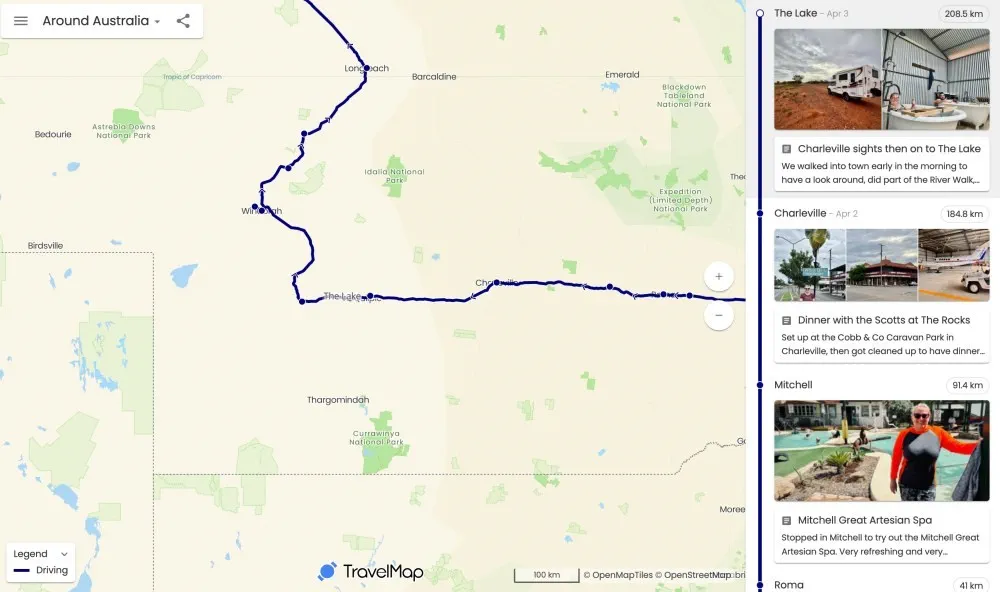
These segments in the timeline view may also contain an image or a post with extra details. The posts will appear as little ‘cards’ that you cab click on to read. Each segment will also show the distance travelled by us on that segment (they’re all going to add up!).
On a PC or tablet the Timeline view will appear on the right of the map. On a mobile device, you will probably see a little marker below the map that you can click on to bring the Timeline view up.
So make sure you are regularly looking at this map view, as this is the area we’ll be updating most regularly — hopefully every (most?) days. You might even want to mark this as a favourite in your web browser.
Enjoy!
← ← Previous · Contents · Next →